SJ MEPLA
Deutsch | English
SJ MEPLA is a glass statics program for structural glass construction.
Below you will find the latest update information for SJ MEPLA:
Update 6.0.1 – free of charge
September 23, 2025
- Adapted to all current Windows updates.
- New menu bar with consistent icons.
- Revised graphics
Update 6.0 – net €500
23. September 2025
As it has been over 6 years since the last paid update, the most important corrections in the current update 6.0 are the adaptations to current operating systems and new Internet functions.
In addition, we have incorporated some improvements and new functions into the user interface.
Of course, all existing projects will be retained!
This update costs only Euro 300.00 net plus an annual support fee of Euro 200.00 net.
Update of all Windows and Internet components
We have adapted the program to all current Windows and Internet components. With SJ MEPLA 6.0 you are using a future-proof program version. The calculation of projects is up to 10 % faster than in version 5.0.
New license file
With the new version of the “sj_mepla.lic” license file, logging in and out and multiple access in the network is much more stable.
In the old version, it often happened that the file was blocked during access and this block could only be removed with a new license template. In addition, an external log file is now output, which can be used for additional evaluation by the IT administrator. This log file is written directly to the license path.
New navigation structure
We now use a new and modern component to display the projects on the left in the navigation structure. With this new component, projects can be loaded and managed more quickly.
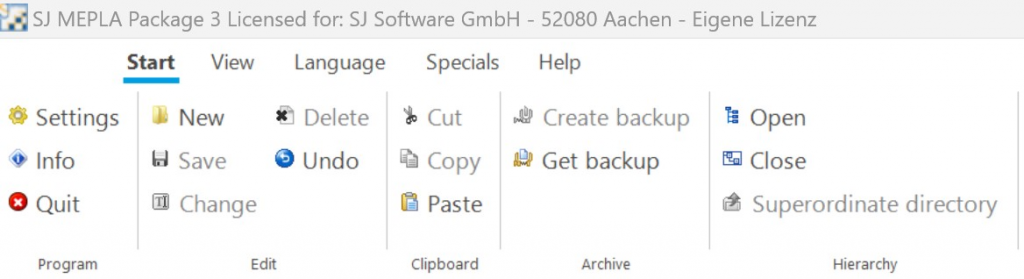
New menu bar
The new menu bar has a clearer structure and is easier to use.
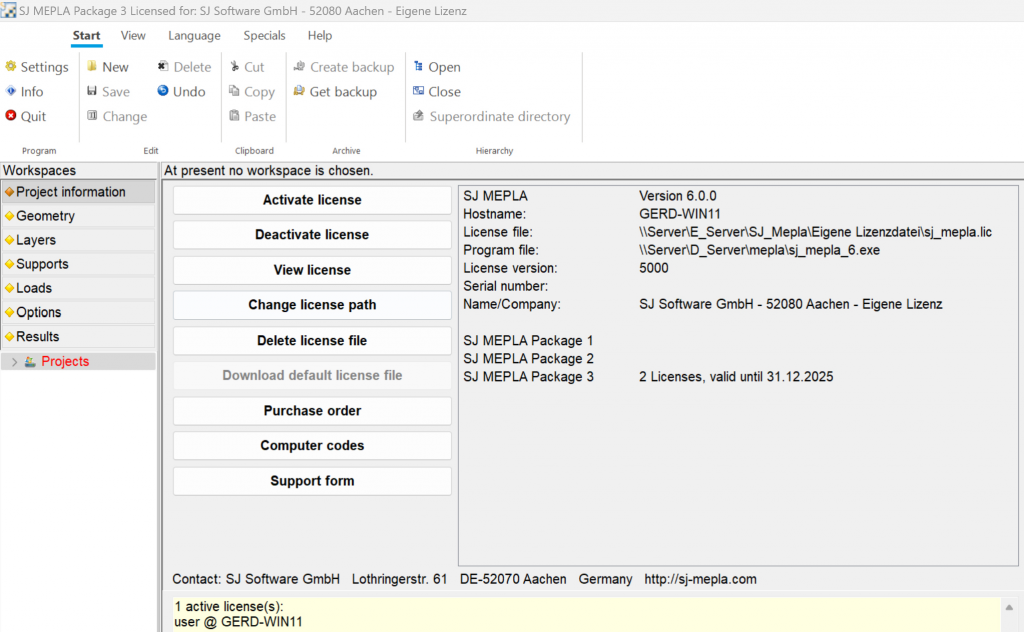
New start and info dialog
The old start dialog often caused problems and has therefore been completely removed. The new info dialog has a clearer structure and contains new functions that make it easier to manage the license file. When an update is available, an additional information button appears, with which you can immediately call up all new update functions.
Project backup to a ftp server
Projects can now be backed up directly to a ftp server and retrieved again. This can be used as a normal data backup and also as a transfer function to another computer, e.g. in the home office.

Multiple project paths
For a better overview, 3 different project paths can be set. The path can be easily changed with a mouse click. This allows existing projects to be better structured.